
We need to talk about... Dynamics 365 Sales... Sales Research Agent

Next in my blog series is a feature I covered when it was first released earlier this year, but of course the functionality has moved on since. This feature is the Sales Research Agent in Dynamics 365 Sales and today's takes a closer look at the features and functionality of the agent itself.
As I discussed in my recent release wave post on Dynamics 365 Sales you will have noticed the platform is leaning hard into agents that don't just suggest things, they actually go and do the digging for you.
The Sales Research Agent is one of the best examples of this, and today I want to walk through what it actually is, how you get it switched on, and how you build your own custom business processes so it queries your data the way your teams actually thinks about it.
What is the Sales Research Agent
First of all, a quick bit of background, the Sales Research is similar to a research analyst sitting inside your Sales Hub who never sleeps. You ask it a business question in normal language, something like "which accounts are most at risk of churn this quarter" or "how is my team tracking against target by region", and it goes off, interrogates your Dynamics 365 Sales data, and comes back with what Microsoft calls a research blueprint.
By default it's connected straight into your Dynamics 365 Sales data, but you're not limited to that as you can point it at other Dataverse environments, a Fabric Lakehouse, or simply upload an Excel, CSV, or PDF file to bring extra context into the conversation.
Dur to the fact it's a proper back-and-forth research canvas rather than a one-shot chatbot, you can keep asking follow-up questions and watch the blueprint evolve, with a full journey line showing how you got from your first question to your final answer.
Getting it switched on
Before your users can start playing with it, there's some initial configuration to do, and this is where I want to focus first because it trips a lot of people up.
Copilot Studio capacity - The agent runs on Copilot Studio, so you need enough Copilot credits allocated to the environment it's running in.
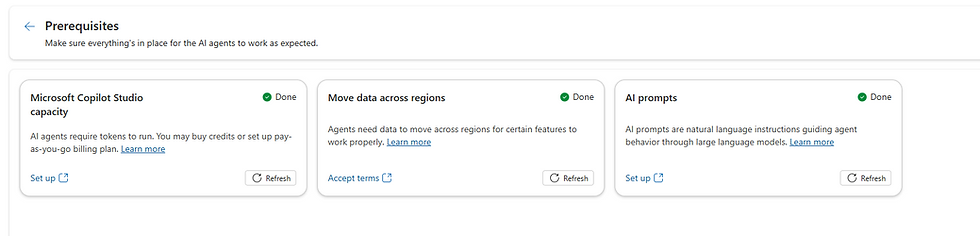
Access - By default, only System Administrator and System Customiser roles can see the Sales Research Agent menu in Sales Hub. To open it up to your sales managers and leaders, you need to assign them the Sales Research Agent Reader security role through the Power Platform Admin Center.

Business functions
Once it's switched on, the agent doesn't arrive blank. It comes with a couple of built-in business functions already configured
Pipeline Exploration
Sales Operations
Each with a set of suggested research topics to get you started. Selecting a business function before you ask your question matters more than people expect, because the same underlying data can produce genuinely different blueprints depending on which one is active.
Before you even think about building your own, there's also a "general context" tab worth setting up on day one.

This is where you tell the agent about your fiscal year, your currency, your industry, and your role, plus a data dictionary of the acronyms your business uses. If your sales team talks in ARR, MRR, or some internally invented shorthand, teach the agent what it means here, once, rather than having every user spell it out in every prompt.
Building your own custom business process
This is the part I actually think most organisations will get the most value from, because the out-of-the-box functions are generic by design. Your business isn't generic, so this is where you teach the agent to think like you do.
Microsoft's approach here is called Business Function Builder, and the genuinely good news is that it's built for business users, not developers. You don't need to know your Dataverse schema inside out or write a line of code. Here's how it works in practice:
Describe what you want in plain English - Something like "help my account executives analyse their top 20 accounts to spot upsell and cross-sell opportunities, focusing on revenue, product adoption, support tickets, and interaction history over the last 12 months." You can also upload reference material like sales playbooks, methodology docs, or KPI definitions to give the builder more to work with.

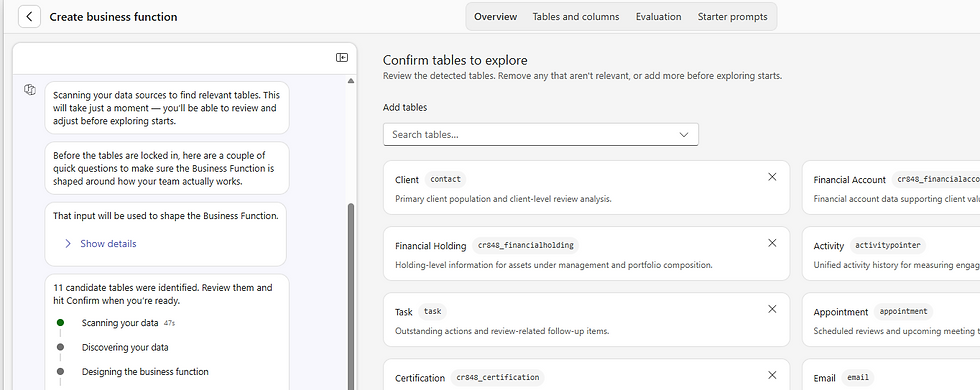
Let it discover your data - The builder scans your environment and proposes the tables it thinks are most relevant, called anchor tables. You review the list, keep what's central to the use case, add any custom tables it's missed, and strip out anything your organisation doesn't actually use.
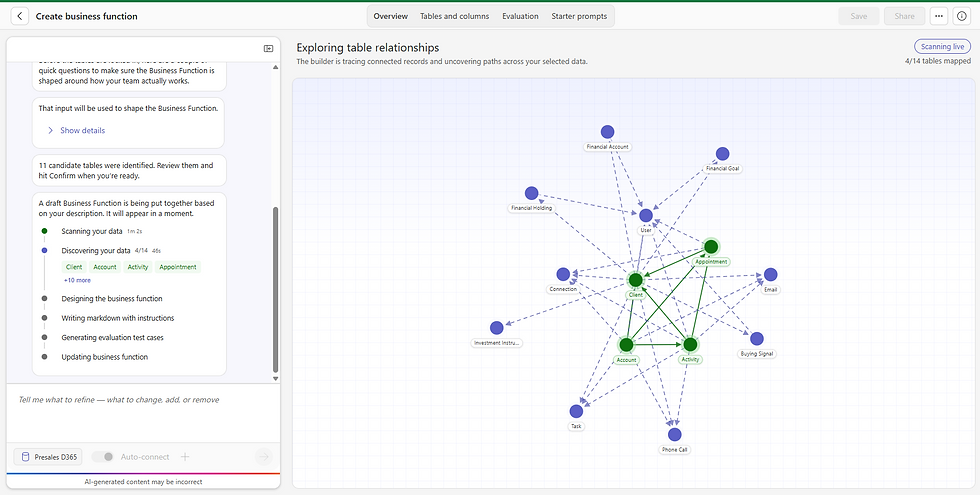
Answer a few clarification questions - The builder will ask you things like which table represents your activity history, or how your custom pipeline stages map to forecast categories. This is really just the builder asking for your business knowledge where the schema alone can't tell it.

Review the generated draft - Out comes a full business function: a role description, business context, data instructions, a glossary of terms, and hints on how to interpret specific tables and columns.
Save it, and validate it before you share it widely - There's a built-in evaluation experience where the builder generates test questions, runs them against your new business function, and shows you pass rates and where it fell short. It's a genuinely sensible step before you roll a new business function out to a whole sales team, because it catches misunderstandings early rather than in front of your leadership team.

Once saved, that business function sits alongside the out-of-the-box ones and can be selected the same way, so from that point on, anyone researching account planning, territory planning, or whatever use case you've built, gets answers grounded in how your organisation actually defines the data, not Microsoft's generic assumptions about it.
Results

Summary
The Sales Research Agent is a genuinely useful example of AI agents doing real analytical legwork rather than just offering a suggestion box.
But the configuration work, getting licensing and access right, setting your general context, and above all building business functions that reflect how your organisation actually talks about its data, is what turns it from a nice demo into something your sales leaders will actually trust and use week to week.
Don't skip the Business Function Builder step. It's the difference between an agent that gives generic answers and one that genuinely understands your business.
Hope you all enjoyed this one on the Sales Research Agent. Take Care, Speak Soon!


Comments